 Fulfillment< @ >HQ Group


Install HQ Dropshipping - SKU Manager from the Shopify App Store to automate your SKU management.
Managing product SKUs may seem like a small task, but it plays an important role in ecommerce order fulfillment. When product information is incomplete or SKUs are missing, orders may fail to sync properly with warehouse management systems (WMS), creating delays and additional manual work.
For Shopify sellers working with multiple products and variants, manually creating and maintaining SKUs can quickly become time-consuming.
An automated SKU management system offers a more efficient solution. By automatically generating SKUs for new products and identifying existing Shopify SKUs, sellers can simplify product management, reduce human errors, and improve order processing efficiency.
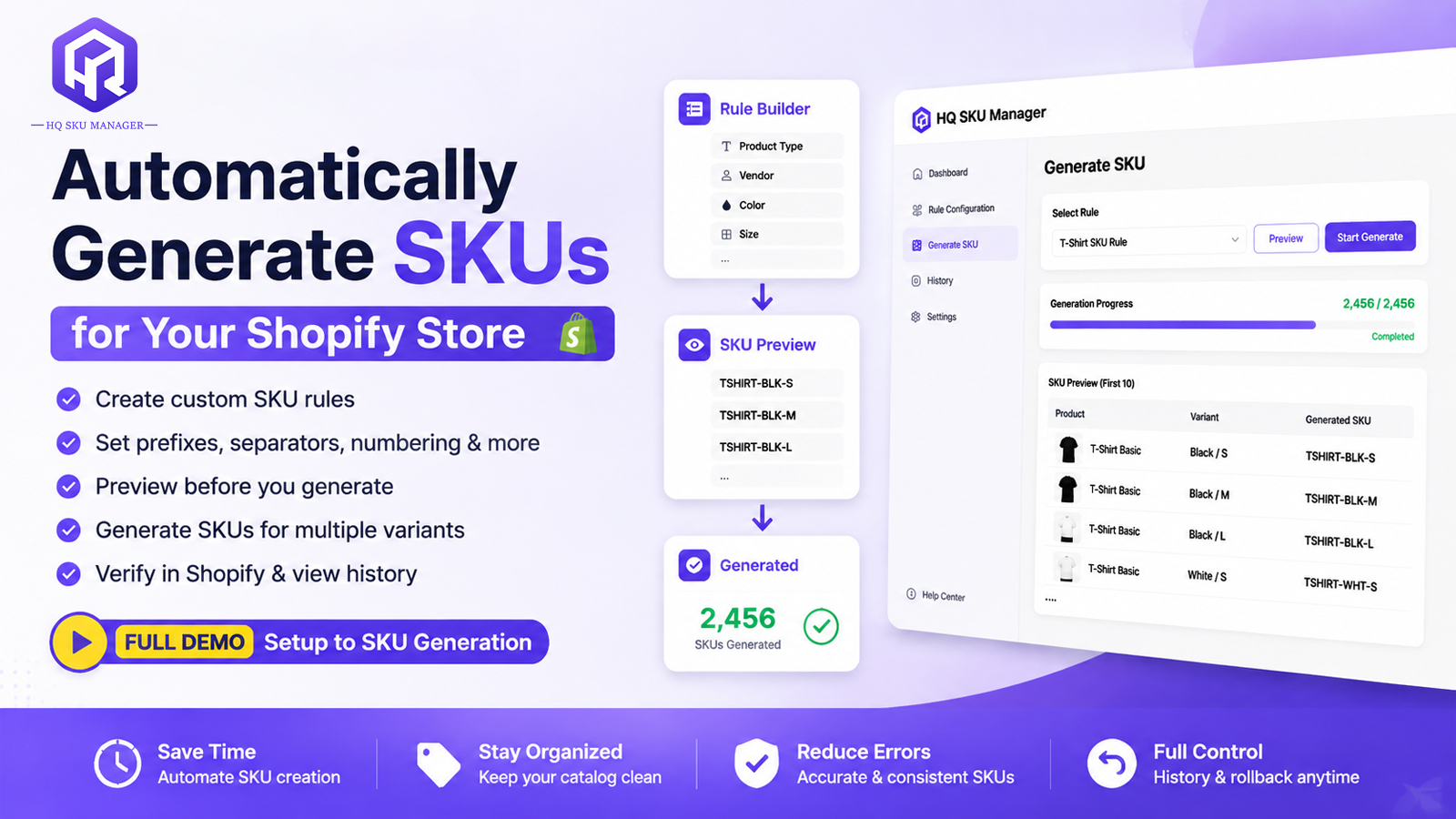
A SKU (Stock Keeping Unit) is a unique identifier assigned to a product or product variant. It helps sellers, suppliers, and fulfillment teams identify products accurately throughout the order processing workflow.
In a typical ecommerce fulfillment process, SKU information connects product listings, customer orders, warehouse inventory, and picking operations.
When a product has no SKU, the system may be unable to match the ordered item with the correct product in the WMS. This can prevent orders from being created or synchronized correctly.
Common SKU management challenges include:
Missing SKUs when new products are uploaded.
Manually creating SKUs for every product and variant.
Inconsistent SKU formats across different products.
Duplicate SKUs that make product identification difficult.
Additional work when synchronizing Shopify orders with a WMS.
A standardized and automated SKU management process helps prevent these problems before they affect fulfillment.
One effective way to prevent missing SKU information is to establish automatic SKU generation during product listing.
Instead of waiting until an order arrives to discover that a product has no SKU, sellers can generate SKU codes in advance.
With an automatic SKU generator, businesses can:
Assign SKU codes to products more consistently.
Create identifiers for products and their variants.
Reduce the risk of missing SKU information.
Prepare product data for smoother warehouse synchronization.
This is particularly useful for stores that frequently add new products or manage large product catalogs.
By ensuring products have corresponding SKU codes, sellers can reduce the possibility of orders failing during WMS synchronization because of missing identifiers.

Not every Shopify store needs to create new SKUs from scratch.
Many sellers already have SKU information in their Shopify product catalog. Re-entering this information into another system creates unnecessary duplication and increases the possibility of human error.
An efficient SKU management tool should be able to recognize and retrieve existing Shopify SKU information automatically.
This helps businesses:
Avoid manually creating the same SKU information twice.
Reduce repetitive data entry.
Minimize inconsistencies between Shopify and fulfillment systems.
Improve product matching during order synchronization.
By using existing Shopify SKU data, sellers can simplify the connection between their ecommerce store and warehouse operations.
Different businesses have different product management requirements. A flexible SKU generator should allow sellers to establish rules that match their product catalog.
With HQ Dropshipping - SKU Manager, users can configure SKU generation rules based on their needs.
Product Variants
Sellers can select product variant attributes such as color and size to include in the generated SKU. This makes it easier to distinguish between different versions of the same product.
Series Codes
The system supports including a series code in the SKU. Enabling the "Include series code" option assigns each product its own five-character series code, helping reduce duplicate SKU codes.
Product Scope
Users can select which products the SKU rule applies to, rather than applying the same rule to every product without distinction.
SKU Preview and Generation
Before applying a rule, users can preview the generated SKU codes. Once the results are confirmed, they can click Generate to apply the rule.
These options help sellers establish more consistent SKU structures while reducing unnecessary manual work.
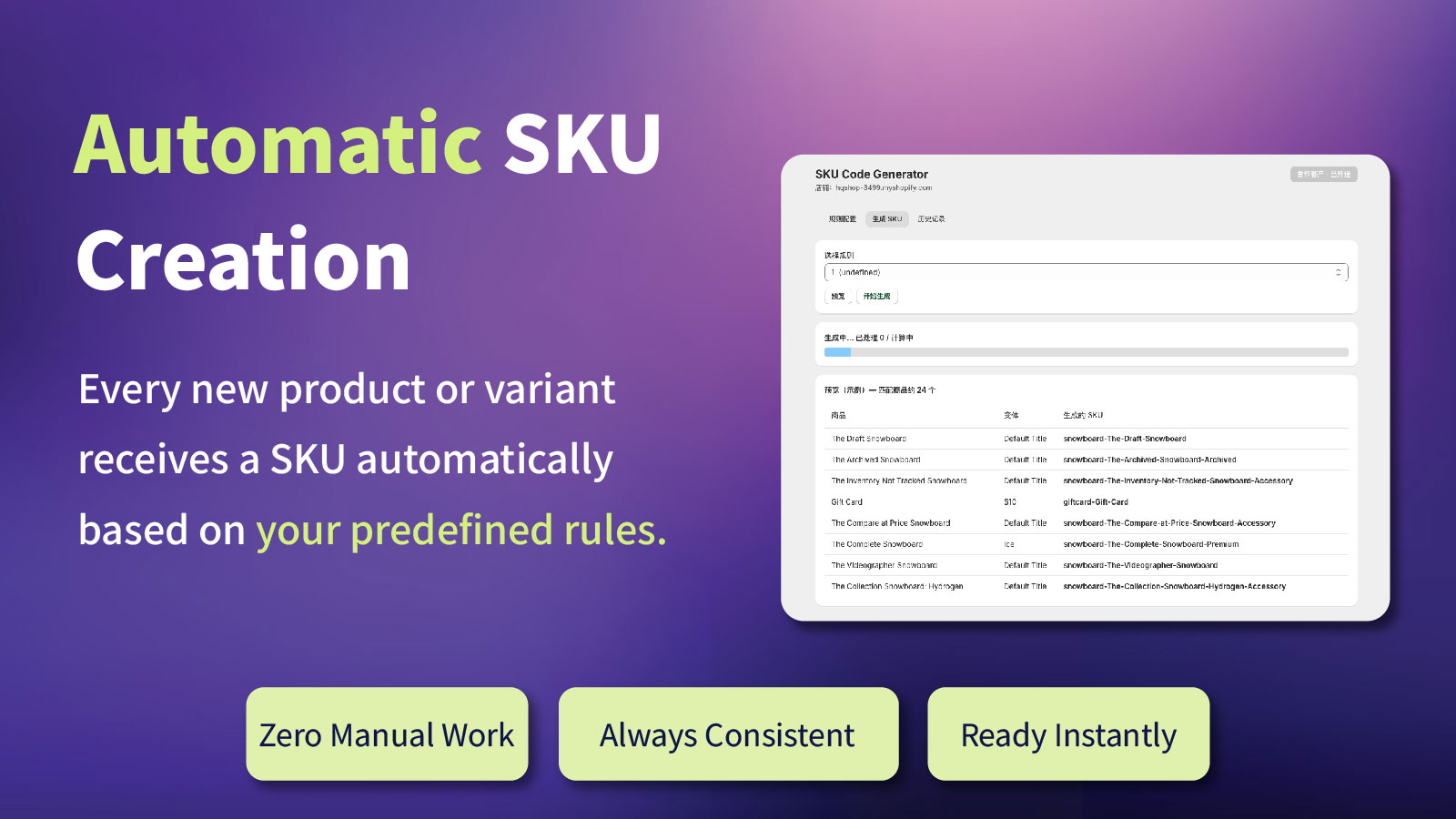
SKU management is not just about organizing product information. It also directly affects order fulfillment.
When a Shopify order is synchronized with a WMS, the system needs accurate product identifiers to match each ordered item with the corresponding warehouse product.
If an SKU is missing or inconsistent, the order may fail to be created or synchronized correctly.
With automatic SKU generation and Shopify SKU identification, sellers can improve product data consistency before orders enter the fulfillment workflow.
This helps:
Reduce SKU-related order synchronization issues.
Minimize manual product matching.
Improve warehouse order processing efficiency.
Reduce avoidable delays caused by incomplete product information.
For ecommerce businesses processing orders regularly, these improvements can make daily fulfillment operations more organized and reliable.
To make SKU management easier for Shopify sellers, HQ provides the HQ Dropshipping - SKU Manager app.
The tool helps users configure SKU generation rules, preview results, and apply generated codes to selected products.
Its key capabilities include:
Automatic SKU Generation:
Generate SKU codes based on customized rules.
Variant Identification:
Include product attributes such as color and size.
Series Code Support:
Add unique five-character series codes to help avoid duplicate SKUs.
Rule Preview:
Review generated SKU results before applying them.
Generation History:
Check previous SKU generation records.
Revert Function:
Undo a previous generation operation if an error is found.
For HQ partner clients, the app is available through an access application and approval process.
After installing the app from Shopify, users need to request access by providing their company, contact name, and email information. Once access is approved, they can configure SKU rules and start generating SKUs.
The app is currently available for HQ partner clients. If the cooperation ends, access permissions need to be withdrawn, and continued use will require a paid subscription.
An SKU helps identify individual products and variants. It is important for inventory tracking, product matching, and synchronizing orders with warehouse management systems.
Missing SKU information may prevent the WMS from correctly identifying an ordered product, potentially causing order creation or synchronization issues.
Yes. With a compatible SKU management tool, existing Shopify SKU information can be identified and retrieved without manually creating the same codes again.
Yes. HQ Dropshipping - SKU Manager supports selecting product variant attributes, including color and size, as part of the SKU generation rules.
Yes. The app provides a History section where users can review previous generation records and use the Revert function to undo an operation if necessary.

Effective SKU management is an important foundation for accurate inventory tracking and smooth ecommerce fulfillment.
By automatically generating missing SKUs, identifying existing Shopify SKU information, and standardizing product identifiers, sellers can reduce repetitive work and minimize avoidable order synchronization problems.
With HQ Dropshipping - SKU Manager , Shopify sellers can simplify SKU management and prepare product information for a more efficient WMS fulfillment workflow.
Install HQ Dropshipping - SKU Manager on Shopify and start automating your SKU management today.
📩 Email: zoye@fulfillment-cn.com
Our website:
https://www.cnfulfillment.com/
Previous Recommendations


Ecommerce Returns| International Returns Management| Product Inspection| Returns Processing| Inventory Recovery| Cross-Border Returns




Don't wait until next year, grab the chance on 2025. Here are some recommended ecommerce topic you can choose.

Thanks to the support and trust from our customers. Flashback with our beloved partners.